Sammera

How Sammera works

A desktop app that sits beside your phone system during the call, and a web app where you run the team, the documentation and the settings.

From sign-up to the first call

  1. Create your organisation

    Sign up on sammera.com, name the organisation and invite the team. The free trial starts here.

  2. Bring your documentation

    Import the files you already have, or write new pages in the editor.

  3. Write your checklist

    The questions every call should cover. Sammera gives you a starting set, and you change it freely.

  4. Install the app and take a call

    Each person installs the Windows app, signs in and picks where the caller is heard from.

During the call

The panel floats on top of whatever you work in. Move it, resize it or collapse it when you need the space.

Three seconds to change your mind

The panel wakes up when the call connects and counts down from three. Press Cancel and nothing is transcribed.

3

We start listening in three seconds.

Cancel, don't listen

Both voices, kept apart

Your microphone and the caller's audio are transcribed separately, so the transcript always knows who said what.

CustomerHi, the VPN keeps dropping when I work from home.
YouOkay, let's look at that. Does it happen as soon as you sign in?

Your questions, one at a time

The standard questions are shown one by one. Step forward as you cover them, or back if you skipped one.

Question 3 of 10
Are you on the office network or at home?

An answer with its source

Press Suggest an answer and Sammera searches your documentation. The steps come back with the page they were taken from. You can also let the panel search by itself a few minutes into every call.

Looks like the VPN client disconnects shortly after sign-in.
Steps to take
1Check that the client is updated to 5.2 or later.
2Remove the saved profile and add it again.
3Switch from UDP to TCP in the connection settings.
Procedures › VPN › Troubleshooting, updated 14 days ago

No answer means no guess

When nothing covers the question, the panel says so. The question is saved as a gap for whoever owns the documentation.

No documentation found

Nothing covers this, so there is no guess. The question is saved as a gap.

Describe the gap

The wrap-up is written

When the call ends, a summary and a draft for your ticket or CRM are ready to copy.
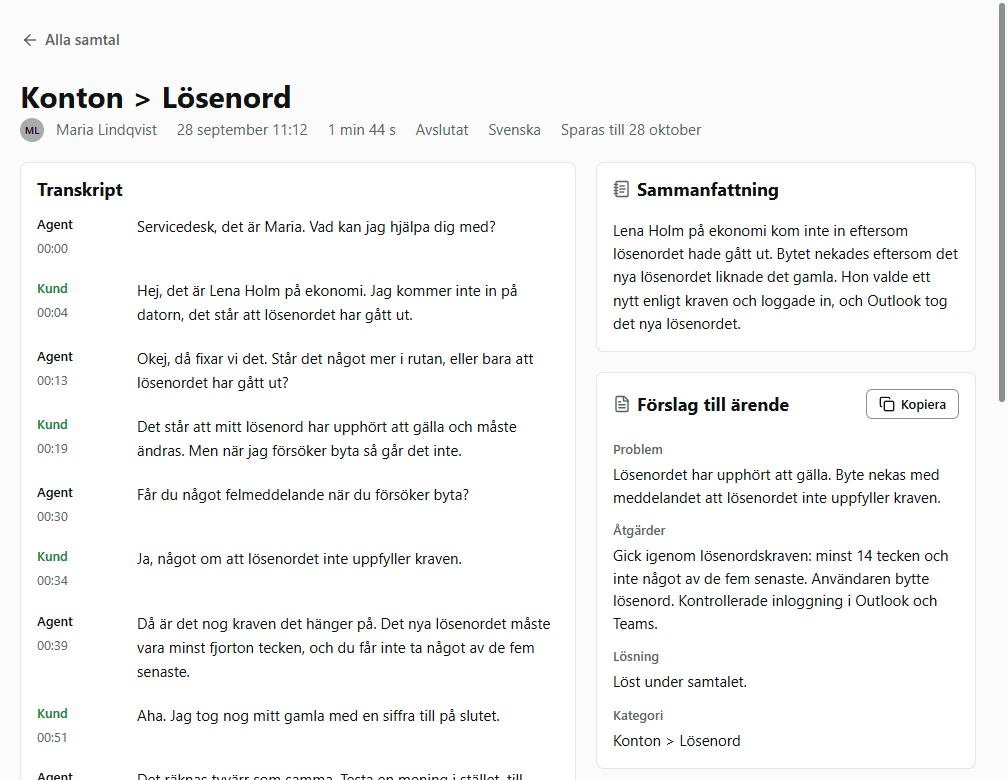
SummaryThe user could not stay connected to the VPN from home.
ActionsUpdated the client to 5.2. Switched to TCP.
ResolutionTCP fixed it. The user's router blocks UDP.
CategoryNetwork › VPN
Copy to clipboard

After the call

The call page in Sammera with the transcript in the middle and the summary and ticket draft beside it

The whole call on one page

Transcript, summary and draft together, for as long as your organisation keeps transcripts.
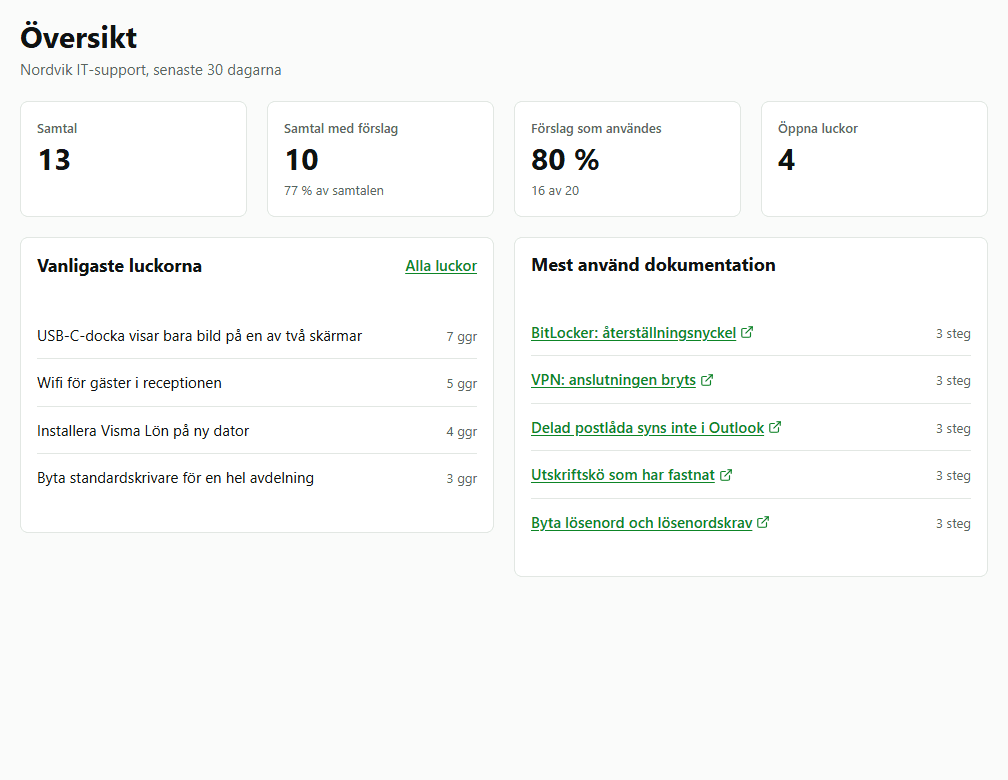
The overview in Sammera with number of calls, suggestions used, the most common gaps and the most used documentation

What the calls say about your documentation

Which pages are used on calls, and which questions had no answer.

The screenshots show made-up calls and people.

Documentation that improves with every call

Sammera keeps your documentation itself, so the answers on a call come from pages you can read, edit and trust.
Import
Word, PDF, PowerPoint, OneNote, Confluence, Notion, Markdown and HTML. Importing the same export again only updates what changed.
Edit
An editor with numbered steps, images and version history.
Suggest
Agents suggest changes, and a lead reviews them as a marked-up change before accepting.
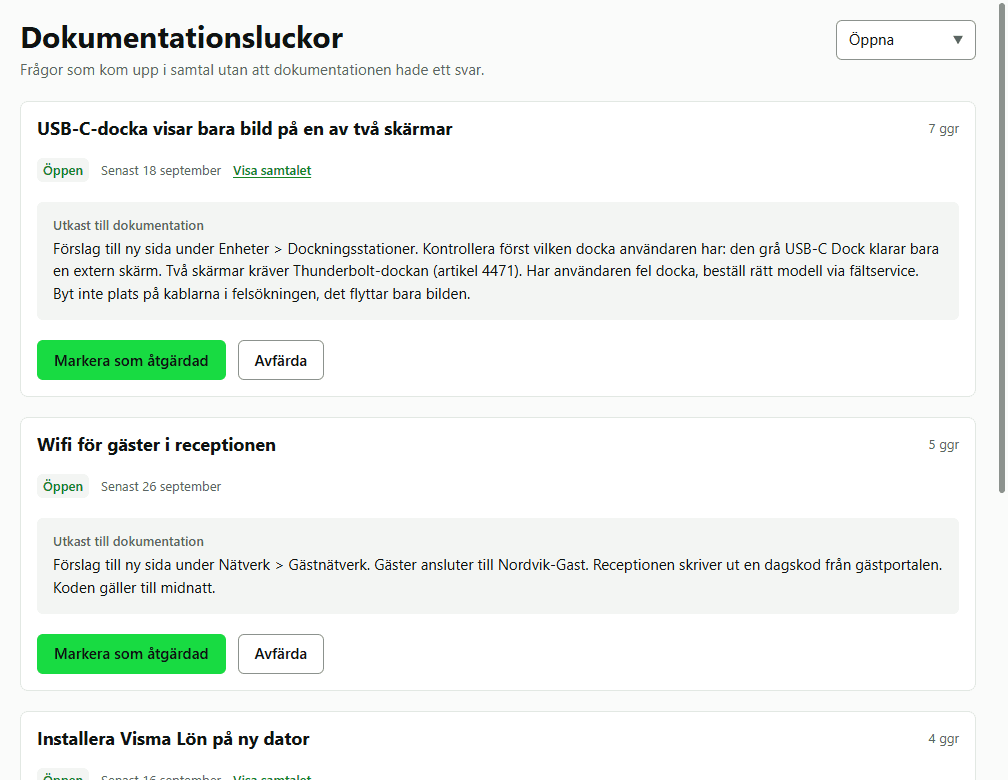
Fill the gaps
Questions that had no answer collect as gaps, each with a draft to start from.
The list of documentation gaps in Sammera, each with a draft of the missing text

For the people who run the team

Four roles
Owner, admin, team lead and agent. By default an agent sees only their own calls.
Seats
Give a seat to each person who takes calls, and take it back when they leave.
What is kept
Transcripts for 1 day to 1 year, or not at all. Audio is off unless you turn it on.
Who sees what
You choose whether team leads see the team's calls. Every change is logged with name and time.
Your own AI
Connect your own Claude key or an OpenAI-compatible server in place of Sammera's AI.

Read about security and data protection

  • Windows 10 or 11The app for calls is a desktop app for Windows. The web app works in any browser.
  • A softphone on the computerSammera hears the caller through the computer's audio. A desk phone does not work.
  • Calls in SwedishEnglish is next.

Try it on your own calls

Thirty days is long enough to import your documentation, take real calls and see whether the team keeps it on.

  • No cardNothing to cancel if it is not for you.
  • Sammera's AI includedNo key to arrange before the first call.
  • Your data stays yoursDelete the organisation and everything in it goes at once.